


Realtor videos are short, story-driven clips that showcase properties, neighborhoods, and an agent’s expertise to generate qualified leads. From our Maple Ridge studio at 13260 236 St in BC, Silver Valley Studios Inc. plans, films, and edits listing tours, vertical reels, and drone flyovers that help realtors capture attention, build trust, and book more showings.
By Sumeet S., Founder & CEO, Silver Valley Studios Inc.
Last updated: 2026-06-16
At a Glance
Realtor videos work when they’re simple, short, and strategic. Lead with a clear hook in the first 3–5 seconds, show 8–12 hero visuals, and finish with one call to action. Keep horizontal tours near 60–90 seconds and vertical reels 15–30 seconds. Post natively on each platform and track watch time, clicks, and inquiries.
This complete, practical guide shows Greater Vancouver and Vancouver Island agents exactly how to plan, film, and distribute realtor videos that convert.
- What realtor videos are and why they matter in 2026
- How to structure fast, watchable listing tours and vertical reels
- 13 proven video types that attract buyers and sellers
- Gear, software, and posting workflows that save hours
- Mini case examples from our Maple Ridge–based team
Table of contents
- What Are Realtor Videos?
- Why Realtor Videos Matter in 2026
- How Realtor Videos Work (Step-by-Step)
- Types of Realtor Videos (13 Examples)
- Best Practices for Watchable Videos
- Tools & Resources
- Mini Case Studies & Local Considerations
- Frequently Asked Questions
- Conclusion & Next Steps
What Are Realtor Videos?
Realtor videos are short, purpose-built videos that market listings, neighborhoods, and agent expertise. Effective formats include 60–90 second cinematic tours, 15–30 second vertical reels, agent intros, seller updates, and drone flyovers. The goal is simple: earn attention fast, deliver key details, and drive one clear action.
In our experience producing real estate media across Greater Vancouver and Vancouver Island, the most successful realtor videos share three traits: clarity, pacing, and specificity. Clarity means one message per video. Pacing means tight edits with 2–3 second shots. Specificity means concrete details buyers care about—layout, light, storage, and flow.
Take a suburban family listing. A 75-second tour with 10–12 clips, one neighborhood b-roll beat, and an end-card CTA consistently outperforms a 4-minute walkthrough. Why? Short form matches buyer behavior. Add a 20-second vertical highlight for Instagram Reels and TikTok, and you earn reach where your photos alone won’t travel.
Why Realtor Videos Matter in 2026
In Maple Ridge and across BC, buyers are mobile-first and attention-poor. Realtor videos matter because short, visual storytelling increases listing visibility, time-on-page, and showing requests. When you pair cinematic tours with vertical reels and drone, you meet buyers on every screen and move them from curiosity to inquiry.
Here’s the reality: most shoppers skim. Video earns a longer glance. A simple structure—hook, highlights, CTA—holds attention better than a photo gallery alone. On social, 15–30 second reels spark saves and shares. On portals and your site, 60–90 second tours lift dwell time and encourage clicks to book a showing or request a floorplan.
Optimization compounds results. Clear titles, accurate descriptions, and consistent posting windows increase discovery. As TechWyse’s video SEO guidance notes, strong metadata and engagement signals help videos surface more often in search and recommendations. That’s leverage you can feel in weekly inquiry logs.
- Buyer comfort: 24/7 access to layout, light, and flow
- Agent authority: your voice and market POV on camera
- Retention lift: 8–12 quick cuts keep watch rate healthier
- Distribution fit: horizontal for sites/portals; vertical for social
When we combine a 75-second tour, a 20-second reel, and 3–5 drone shots, we routinely see faster message replies and earlier booking windows. The content kit is compact but covers every platform your prospects use.
How Realtor Videos Work (Step-by-Step)
Great realtor videos follow a repeatable workflow: define one outcome, script a 3-line hook, storyboard 8–12 shots, stage and light, capture horizontal and vertical, add captions/branding, publish natively, and track watch time and clicks. Keep production light so you can post fast—ideally within 24–48 hours of filming.
1) Strategy: choose one outcome
Decide exactly what a viewer should do in 10 seconds: book a showing, download a floorplan, or DM for the feature sheet. One outcome clarifies your script and on-screen text. We recommend 1 CTA per video and repeating it once at the end.
2) Script: write a 3–5 line hook
- Line 1: the big promise (“Sunlit corner home with a yard made for summer”)
- Line 2: the qualifier (“3 beds + den, updated kitchen, EV-ready garage”)
- Line 3: the action (“Watch to the end for the primary suite walk-in”)
Keep total read time under 8 seconds. If it’s longer, it’s too long.
3) Storyboard: 8–12 must-have shots
- Exterior establishing (drone or slider), 2–3 seconds
- Main living hero shot, 2–3 seconds
- Kitchen island and appliances, 2–3 seconds
- Primary suite and ensuite, 2–3 seconds
- Workspace/den, 2–3 seconds
- Backyard/patio, 2–3 seconds
- Neighborhood beat (park path, café exterior), 2–3 seconds
- CTA end-card, 2 seconds
That’s 20–30 seconds of raw highlights. Add pacing and music and you land at a 60–90 second cut that feels brisk, not rushed.
4) Production: stage, light, and capture both formats
Open blinds, turn off mixed-temperature lamps, and declutter surfaces. Capture each shot twice—horizontal (16:9) for websites/portals and vertical (9:16) for Reels/TikTok/Shorts. Aim for 24 or 30 fps for cinematic feel and 60 fps if you plan slow motion b-roll.
5) Post: edit for momentum and clarity
- Cut shots to 2–3 seconds; avoid lingering pans
- Start with your best room, not the exterior
- Add on-screen labels for 3–5 must-know features
- Burn in captions for intro lines; many viewers watch muted
- Brand bumpers: 0.5–1.0 second open/close with logo mark
6) Publish natively, write searchable text
Upload directly to each platform. Use a keyworded title (“3-Bed Maple Ridge Home Tour”) and a 1–2 sentence description calling out bedrooms, baths, and standout features. Finish with a single, explicit CTA and a booking path.
7) Measure and adjust
- Watch rate: aim for 35–50% on 60–90 second tours
- Average view duration: 20–40 seconds is a strong baseline
- Clicks/inquiries: track weekly to spot topic patterns
Want a done-for-you option? Our team produces tours, reels, and drone flyovers that align with your brand voice. Learn how we structure edits in our real estate videography guide and explore packages on our videography services page.
Types of Realtor Videos (13 Examples)
The best mix is simple: one 60–90 second cinematic tour, one 15–30 second vertical reel, and a 10–15 second drone hero cut. Round it out with agent intros, seller updates, testimonials, and neighborhood beats so each listing gets 3–5 assets you can post across two weeks.
Below are the formats we use most with Greater Vancouver and Vancouver Island agents. Pick three per listing. Keep each video focused on one idea, and don’t recycle the same opening shot twice in a row.
Core listing formats
- Cinematic listing tour (60–90s): 10–12 cuts, music-driven, labels for 3–5 features.
- Vertical highlight reel (15–30s): 5–7 punchy clips, text-led hook, ending CTA.
- Drone flyover (10–15s): Approach + orbit + reveal, golden hour preferred.
- Room spotlight (20–30s): One hero space, 3 shots, quick voiceover.
Authority builders
- Agent intro (20–30s): Who you serve, one proof point, one CTA.
- Seller update (15–30s): Market activity notes; pairs well with weekly email.
- Buyer tip (15–30s): One tactic (financing, inspection prep, offer timing).
- Testimonial (20–45s): Client voice, one obstacle, one win.
Community and lifestyle
- Neighborhood micro-tour (30–60s): 3 spots, 3 shots each, upbeat track.
- Commute snapshot (15–25s): Time to transit hubs or key corridors (no landmarks named).
- Seasonal feature (20–30s): Patio season, fall color, or winter cozy moments.
For social momentum
- Before/after prep (15–30s): Quick staging wins—declutter, lamps off, blinds open.
- FAQ burst (15–25s): One common question with a one-line answer.
| Video Type | Best For | Ideal Length | Aspect | Great Add‑Ons |
|---|---|---|---|---|
| Cinematic Tour | Website, MLS, email | 60–90s | 16:9 | Captions, labels, end-card |
| Vertical Reel | Instagram/TikTok/Shorts | 15–30s | 9:16 | Hook text, emojis, CTA |
| Drone Flyover | Hero opening, website | 10–15s | 16:9 | Orbit + reveal |
| Room Spotlight | Carousels, emails | 20–30s | Both | Voiceover line |
| Agent Intro | Bio, pinned posts | 20–30s | 9:16 | Subtitle burn-in |
For deeper format planning, see our realtor videographer guide and our companion real estate photography guide for cohesive photo/video sequencing.
Best Practices for Watchable Videos
Keep videos tight, bright, and branded. Aim for 2–3 second shots, consistent natural light, and one on-screen label per scene. Record horizontal and vertical on set, add subtitles in edit, and publish natively with a single, explicit call to action. Consistency beats complexity—post 2–3 times per week.
We’ve tested dozens of edit patterns. These rules hold up across property styles and price bands:
Pre-production
- Declutter counters, remove 50–70% of small decor, hide trash/recycling.
- Turn off lamps with warm color casts; rely on window light when possible.
- Prepare a 12-shot list so you don’t overshoot and dilute pacing.
On-camera presence
- Stand 2–3 feet from frame edge; leave space for captions on vertical.
- Deliver 1–2 lines; if you need 4+, split them across two videos.
- Smile on the CTA line; energy matters more than word-perfect delivery.
Filming and audio
- Use a lav mic or camera-mounted shotgun; monitor levels at -12 dB.
- Lock shutter 1/50 at 24 fps (180° rule); stabilize with a gimbal.
- Capture a 5-second room tone clip to smooth audio edits.
Editing and branding
- Cut room reveals at the beat; avoid 5+ second pans that lose viewers.
- Stick to two brand colors for text; reserve logo for open/close only.
- Export H.264 high profile, 20–40 Mbps for 4K masters; 8–12 Mbps for social.
Publishing rhythm
- Batch 3–5 cuts per listing so you can post for 10–14 days.
- Post reels between 8–10 a.m. or 6–8 p.m. local; evaluate your own data.
- Reply to comments within the first 30 minutes to nudge the algorithm.
Want a framework for social posting? Our realtor social media guide pairs these videos with captions and carousel ideas to keep your feed consistent.
Tools & Resources
You don’t need a studio truck. A mirrorless body, a 10–20mm lens, a 24–70mm lens, a 3‑axis gimbal, two LED panels, a lav mic, and ND filters cover 90% of realtor videos. Edit in professional software, export platform-specific files, and use a lightweight analytics sheet to track outcomes.
Here’s a compact, field-tested kit list and workflow that balances quality with speed:
- Camera/lenses: 4K mirrorless; wide 10–20mm for interiors; 24–70mm for lifestyle beats.
- Stabilization: 3-axis gimbal; tripod for locked hero shots; slider optional.
- Audio: Wireless lav or compact shotgun; monitor live.
- Lighting: Two bi-color LED panels; soften with umbrellas; bounce off ceilings.
- Drone: Sub-250g model for nimble exteriors and orbits.
- Editing: Professional NLE; templates for open/close, captions, and lower-thirds.
- Delivery: 16:9 master for websites; 9:16 master for Reels/TikTok/Shorts.
- Tracking: Spreadsheet with columns for date, format, hook, watch rate, clicks, inquiries.
Prefer done-for-you production? We bring HDR photos, cinematic 4K tours, vertical reels, drone, and 2D floorplans + photography together so your campaign feels cohesive and posts on time.
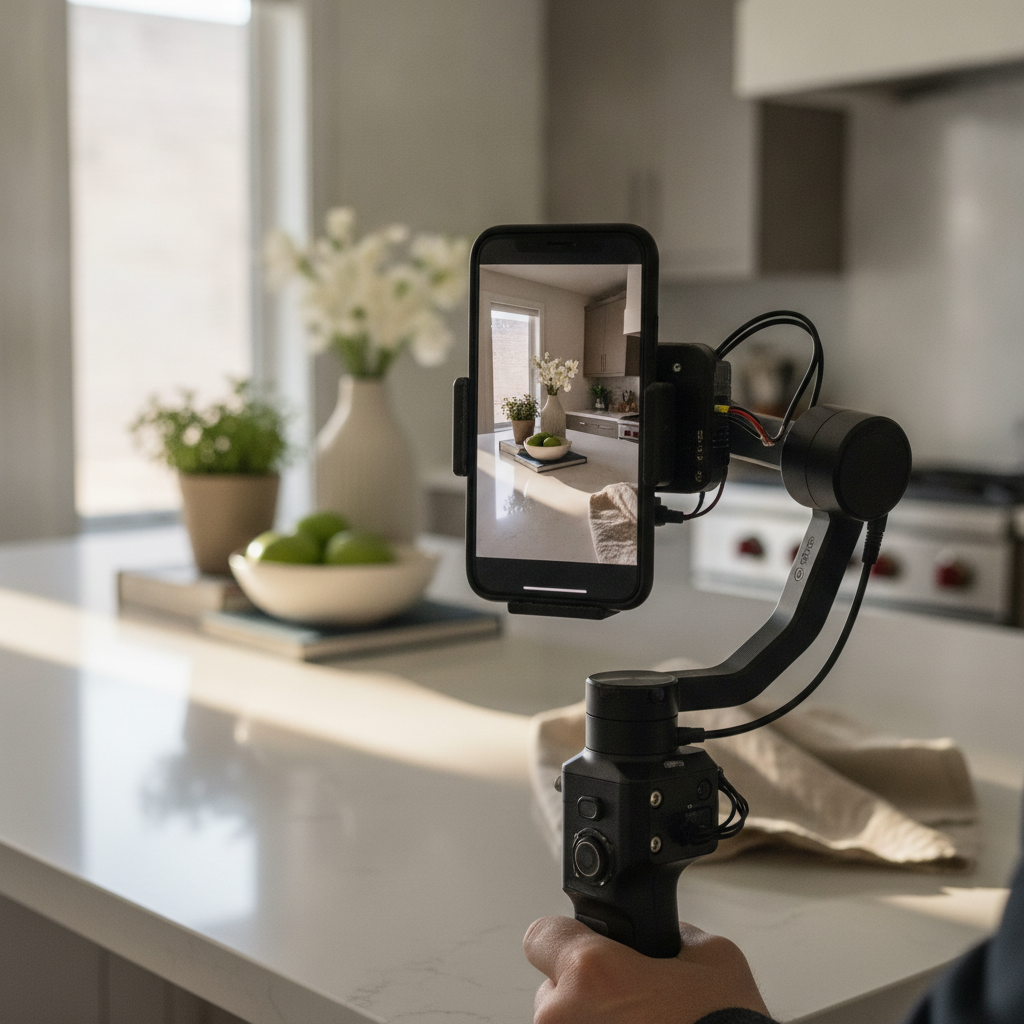
For agents who like to self-shoot occasional reels, curated gear bundles and printed collateral from regional vendors can help keep your brand consistent. Browse examples of realtor marketing packages for inspiration on cohesive signage and leave-behinds that pair well with video content.
Mini Case Studies & Local Considerations
Compact, consistent kits win. Across our Maple Ridge shoots, a three‑asset bundle—75s cinematic tour, 20s vertical reel, 12s drone hero—regularly accelerates inbound replies within the first posting week. Local seasonality and light matter; time exteriors for golden hour and interiors for late morning to keep colors natural.
Mini case snapshots (anonymized)
- Family home near Maple Ridge: 75s tour, 20s reel, 3 drone shots; posted over 7 days; faster reply times observed.
- Townhome project in Surrey: 60s model‑unit tour plus 3 reels; consistent DMs after reels featuring storage and parking.
- New build in Langley: 90s tour with labeled floorplan callouts; seller loved the clarity for out‑of‑town buyers.
Local considerations for Maple Ridge
- Schedule exteriors around rain breaks and cloud cover; overcast is ideal for even color and fewer window blowouts.
- Summer evenings stretch late; plan golden-hour drone passes to capture warm siding tones and yard lines.
- Traffic noise can spike near arterials; record voiceover indoors and capture clean room tone for mixing.
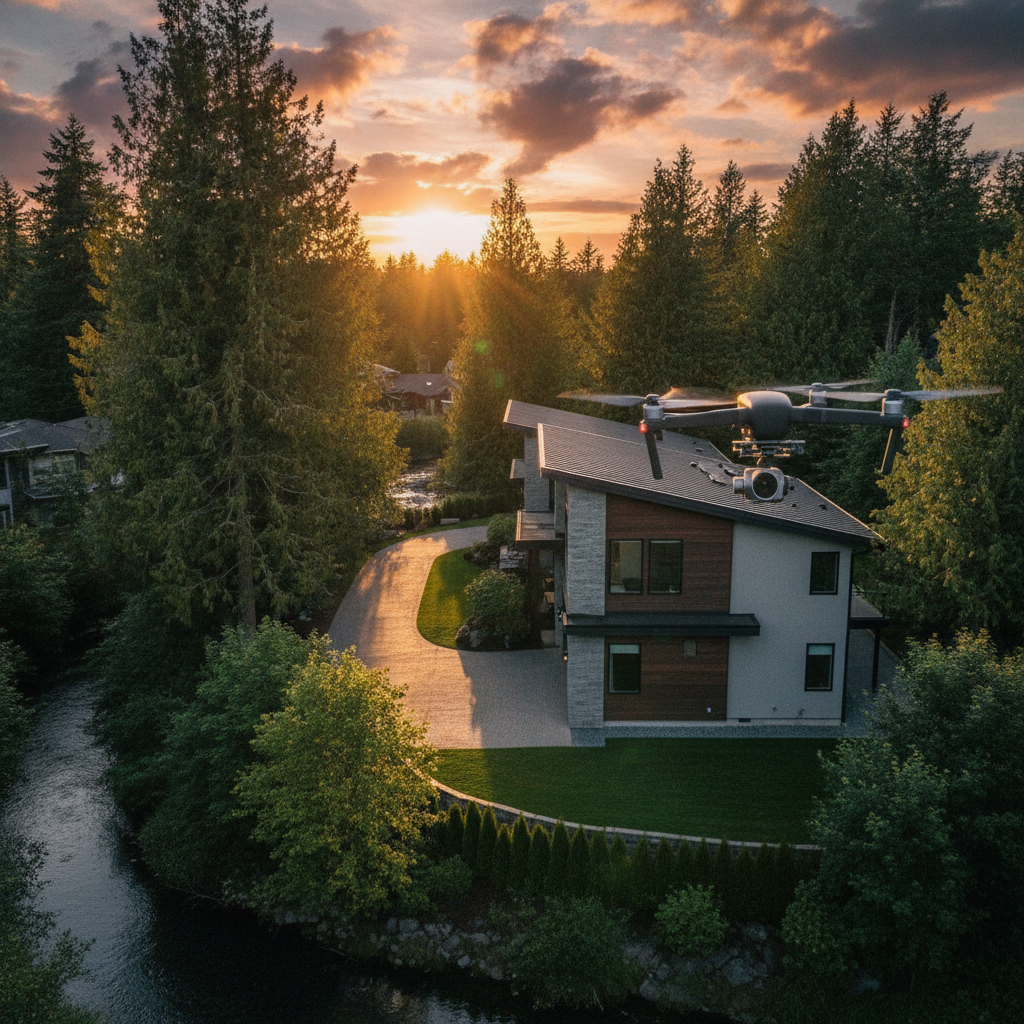
If you’re mapping a high-volume quarter, our real estate videography services and realtor branding photos keep your pipeline stocked with on‑brand assets. For commercial projects, see our commercial videography overview.
Frequently Asked Questions
Most agents need three videos per listing: a 60–90s horizontal tour, a 15–30s vertical reel, and a 10–15s drone hero clip. Keep each one focused on a single message and publish them across 7–10 days to maximize reach and response.
How many realtor videos should I create for each listing?
Three is a strong baseline: a 60–90 second cinematic tour, a 15–30 second vertical reel, and a 10–15 second drone hero cut. This trio covers websites, MLS/portals, and social. If the property is unique, add a 20–30 second room spotlight or a neighborhood beat.
Should I film horizontal or vertical realtor videos?
Both. Capture horizontal (16:9) for websites, MLS, and email, and vertical (9:16) for Instagram Reels, TikTok, and YouTube Shorts. Record each key scene twice on set so you don’t need to crop later. Export separate masters for the best quality.
Do I need to appear on camera?
It helps. A 5–8 second intro with your voice or a quick walk‑in builds trust fast. If you’re camera‑shy, record a single line as voiceover and focus on room reveals. Warm tone, clear audio, and a confident CTA matter more than perfect delivery.
How long should a listing tour be in 2026?
Aim for 60–90 seconds. Use 8–12 quick cuts, start with the best room, and end with one call to action. Longer videos can work for large estates, but trim any clip that doesn’t add new information. Keep vertical reels between 15–30 seconds.
What’s one simple SEO move for realtor videos?
Use plain‑English titles and write 1–2 sentence descriptions with neighborhood and property features. This helps discovery and gives viewers context. For more tactics, review practical tips from TechWyse’s video SEO article.
Conclusion & Next Steps
Keep realtor videos simple and consistent: one message, tight pacing, branded captions, and a single CTA. Pair a 60–90 second tour with a 15–30 second reel and a short drone hero, then publish natively and track watch time and inquiries to refine the next shoot.
Here are your next moves:
- Pick one listing this week and script a 3–line hook.
- Storyboard 10 shots and schedule a 60–90 minute film window.
- Export 16:9 and 9:16 masters, then post on three platforms.
- Measure watch rate, clicks, and replies after 7 days.
If you’d like a production partner that brings photos, video, drone, and floorplans together under one roof, our Maple Ridge team is ready to help. Explore our videography services and book a discovery session in Maple Ridge.
Key Takeaways
Three assets win most: a 75s tour, a 20s reel, and a 12s drone hero. Record both vertical and horizontal on set, add captions, and post natively with one CTA. Track watch rate and replies weekly. Consistency is your competitive edge in 2026.
- Start strong: hook in 3–5 seconds; best room first.
- Keep it moving: 2–3 second cuts; 8–12 clips total.
- Diversify formats: 16:9 for web; 9:16 for social.
- Brand lightly: two colors; logo at open/close only.
- Measure outcomes: watch time, clicks, inquiries.