

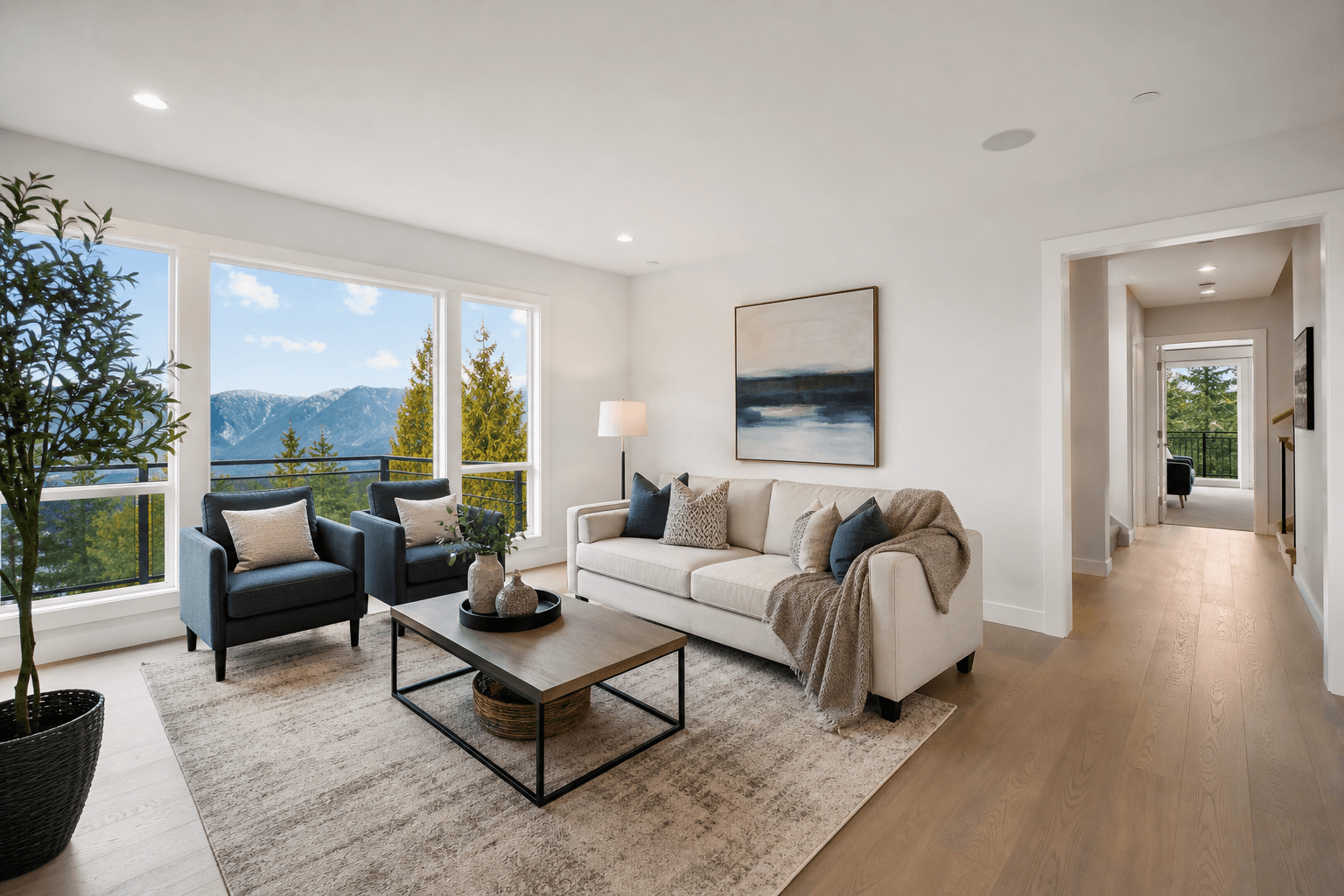
Virtual staging works best when it answers a buyer’s practical question: “How could this room function?” Start with the spaces that are hardest to understand when empty, usually the living room, primary bedroom, and dining area. Then consider secondary bedrooms, offices, or awkward spaces only when furniture will clarify scale or purpose.
The goal is not to make a property look larger, more finished, or better equipped than it is. A strong virtual furniture placement plan preserves the room’s proportions, pathways, openings, architectural features, and actual condition. It also keeps digitally staged stills consistent with the rest of the listing media.
Quick summary

- Prioritize the living room, primary bedroom, and dining area when they are vacant or difficult to interpret.
- Choose furniture that matches the camera perspective and leaves realistic circulation paths around doors, windows, stairs, and built-ins.
- Use virtual staging to explain function, not to conceal condition or imply that furniture, finishes, or features exist when they do not.
- Pair staged photos with real photography, interior walkthroughs, 2D floorplans, and aerial media so each asset answers a different buyer question.
- Review every image for scale, shadows, floor contact, sightlines, consistency, and clear labelling before publication.
Which rooms should you virtually stage first?
If time or editing budget is limited, stage rooms in the order that they help buyers understand the property’s layout and everyday use. In many homes, that means starting with the living room, followed by the primary bedroom and dining area. These spaces tend to anchor the buyer’s sense of scale and lifestyle.
That order is a starting point, not a rule. A compact condo may benefit more from staging its combined living and dining zone. A home with an unusually narrow den may need furniture to show whether the space works as an office. A furnished property may need only selective edits, or none at all.
Ask three questions before choosing a room: Is its purpose unclear when empty? Will furniture help a viewer judge its scale? Can the image remain truthful and consistent with the actual property? If the answer to all three is yes, the room is a strong candidate.
Room-by-room virtual staging priorities

| Room or space | When to prioritize it | What the image should communicate | Common placement mistake |
|---|---|---|---|
| Living room | Usually first when vacant or open to other areas | Scale, seating function, focal point, and connection to adjoining rooms | Blocking windows, doorways, fireplaces, or the main path through the room |
| Primary bedroom | When an empty room does not reveal bed orientation or usable space | Bed position, circulation, storage relationship, and room proportions | Using an oversized bed or crowded furniture that makes the room appear larger than it is |
| Dining area | When an open-plan layout lacks a clear dining zone | How the table relates to the kitchen, living area, and circulation | Adding too many chairs or filling the route between kitchen and living space |
| Secondary bedroom | When the room is small, vacant, or difficult to classify | Whether it functions as a bedroom and how much usable space remains | Adding furniture that conceals a closet, window, or unusual angle |
| Home office or den | When the room’s purpose is not obvious from its dimensions | Workability, daylight, and the relationship between desk and entry | Placing a desk where it blocks the door or exaggerating the amount of workspace |
| Awkward or unfinished space | Only when a restrained layout clarifies a realistic use | Potential function without hiding the space’s limitations | Turning a difficult area into a polished room that the property cannot actually support |
Start with the living room when buyers need to understand flow
A vacant living room can look deceptively large or small because there is no visual reference for scale. Use a sofa, occasional seating, and a restrained focal point to show how people would move and gather. The arrangement should explain the room, not fill every open area.
Begin by identifying the primary sightline from the camera position. Keep the strongest architectural feature visible, whether that is a fireplace, a large window, built-in shelving, or a view. Orient seating toward a plausible focal point while leaving a clear route between the entrance, adjoining rooms, and exterior doors.
Open-plan rooms need particular care. Furniture should define the living area without creating an artificial wall between the kitchen, dining area, and sitting space. If the room only works because the digital furniture ignores a column, stair opening, or low ceiling, the composite is not helping the buyer.
Stage the primary bedroom to show scale and function
The primary bedroom usually needs a simple arrangement: a bed, appropriately scaled side tables, and limited supporting furniture. The bed should sit naturally within the room’s geometry, with enough visible space to understand how the doors, windows, closets, and circulation relate to it.
Do not use an oversized bed to make the room seem more luxurious, or add storage that suggests a walk-in closet where none exists. If a door opens toward the proposed furniture, test that movement before approving the image. The digitally furnished room should remain plausible when compared with the floorplan and other photographs.
For smaller bedrooms, showing less can be more useful. A bed and one or two carefully chosen pieces may communicate function without disguising the room’s compact proportions.
Use the dining area to explain an open-plan layout
Dining furniture can help buyers understand where one zone ends and another begins. A table and chairs should sit within the area that the room’s geometry naturally provides, rather than being placed wherever there is empty floor in the photograph.
Check the relationship between the table, kitchen work areas, patio or balcony access, and the living room. The image should leave a believable route through the space. Avoid a table that touches walls, obstructs an island, or requires people to pass unrealistically close to seated diners.
Keep decoration restrained. The purpose of the dining arrangement is to explain use and proportion, not to create a staged lifestyle scene that competes with the property itself.
Consider secondary bedrooms, offices, and awkward spaces selectively
Secondary rooms deserve virtual staging when their purpose is genuinely unclear. A small bedroom may benefit from a modest bed and limited furniture. A den may be easier to evaluate with a desk, chair, and storage piece. A long, narrow room may need a simple layout that demonstrates its usable length.
However, do not force a purpose onto a space that cannot reasonably support it. A utility room, unfinished area, storage zone, or highly irregular corner may be better shown as it exists, supported by a clear floorplan and accurate description. Staging should clarify potential, not erase limitations.
Partially furnished rooms require an especially careful decision. If the existing furniture is distracting, selective removal or replacement may help. If the room already communicates its function and scale, adding digital furniture can create inconsistency and make the listing harder to trust.
Virtual furniture placement principles that protect accuracy
Believable placement depends on more than choosing attractive furniture. The furniture must sit within the photographed room’s geometry, share the image’s perspective, and behave as though it occupies the same floor and light.
Match furniture scale, perspective, and camera height
Look at the floor lines, wall edges, and horizon implied by the original photograph. Furniture should follow those same directional cues. If a sofa appears to float, tilts against the room, or has a perspective that conflicts with the camera, buyers may notice the composite even if they cannot explain why it feels wrong.
Compare the furniture with fixed references such as doors, baseboards, windows, countertops, and light switches. These elements help reviewers judge whether the digital pieces are plausible without inventing measurements. Avoid using furniture that makes the ceiling height, room width, or window size appear materially different from reality.
Protect circulation paths, windows, doors, and sightlines
Trace the routes a person would take through the room. Check entrances, closet doors, patio doors, stairways, and access to kitchens or bathrooms. Furniture should not obstruct an opening simply because the obstruction is outside the crop or hidden by an attractive angle.
Also inspect what the furniture hides. A fireplace, built-in, exposed beam, unusual window, or important view is part of the property’s story. If the proposed arrangement conceals it, choose a simpler layout or leave the room unstaged.
Keep style restrained and consistent across the listing
Furniture should suit the property’s architecture and likely audience without promising a lifestyle the home cannot support. Use a consistent visual language across rooms, but do not make every room look identical. A modern condo, family home, heritage property, and unfinished development each call for different restraint.
Most importantly, distinguish digitally staged stills from photographs of actual furnishings. The listing should not imply that the furniture will remain at the property or appear in a walkthrough if it is only present in edited images.
When virtual staging is not the best choice
Virtual staging is less useful when the buyer’s main question concerns actual materials, finishes, workmanship, condition, or natural light. In those cases, real estate photography should show the property honestly and clearly. Digital furniture cannot substitute for a sharp photograph of a kitchen, bathroom, flooring, view, or architectural detail.
It may also be unnecessary for a well-furnished home. If the existing furniture is clean, appropriately scaled, and representative of the space, real photography can provide a more direct and credible presentation. Selective edits may be appropriate, but a complete digital makeover could confuse the buyer.
For unusual layouts, a 2D floorplan may communicate more accurately than a heavily staged image. For outdoor context, lot relationships, rooflines, and surrounding landscape, aerial photography may answer questions that furniture placement cannot.
Coordinate virtually staged photos with the rest of the listing media
A listing works best when each asset has a distinct job. Virtually staged stills can help a buyer imagine function. Real photographs establish condition and finishes. A walkthrough demonstrates movement and relationships between spaces. A floorplan explains layout, while aerial media provides site and neighbourhood context.
Do not make the staged image the only representation of a room. Include enough unaltered or clearly identified property media for viewers to understand what is actually present. This is particularly important when a room’s size, storage, view, or architectural feature could be misunderstood from one edited angle.
For rooms that need more context than a still image provides, use floorplan cues and interior walkthroughs to show how the virtually staged space connects to adjoining rooms. The video does not need to reproduce the digital furniture. It needs to show the real flow and proportions clearly.
Use photos for presentation, video for flow, and floorplans for spatial clarity
Still photography gives buyers time to inspect a room and compare details. Video gives them a sense of sequence, movement, and connection. A floorplan provides a separate reference for room shape, relative position, and circulation. These formats complement one another rather than replacing one another.
If a virtually staged living room shows a sofa facing one direction, but the video shows that the actual room has a different natural focal point, label and frame the assets carefully. Do not let the edited still imply that the digital arrangement is physically present. The same principle applies to bedrooms, offices, and dining areas.
Plan complementary media efficiently before the shoot
Coordinating the media plan before photographing the property prevents avoidable contradictions. Decide which rooms require real photographs, which may receive virtual furniture, whether a walkthrough is needed, and whether a floorplan or aerial view will answer questions that the stills cannot.
Silver Valley Studios states that its listing workflow can capture photos, vertical and cinematic video, aerials, and floorplans in one visit, with HDR photos, floorplans, and video delivered on stated timelines. That type of coordinated capture can help an agent prepare the property once while planning a complete set of listing assets. It does not mean the studio provides virtual staging, so any digital furniture work should be scoped separately.
Review accuracy and disclosure before publication
Before publishing, confirm that the complete listing presentation is not false, misleading, or likely to misrepresent the property. A digitally altered image should not conceal damage, change dimensions, invent a room, suggest unavailable fixtures, or imply that furnishings remain with the home.
Use a clear label or notation for virtually staged images wherever the listing platform and marketing materials require it. Keep the wording consistent across the MLS presentation, website, social posts, and brochures. For a practical preparation perspective, you can also review these staging priorities for sellers before the property is photographed.
Pre-publication virtual staging checklist
- Function: Does the furniture make the room’s purpose easier to understand?
- Scale: Does it look plausible beside doors, windows, baseboards, counters, and other fixed references?
- Perspective: Do the furniture edges and verticals follow the original camera angle?
- Floor contact: Do legs, feet, and heavy pieces appear to sit naturally rather than float?
- Light and shadows: Are shadows and brightness compatible with the photographed room?
- Circulation: Can a person realistically reach doors, closets, stairs, windows, and adjoining rooms?
- Architecture: Are fireplaces, built-ins, beams, windows, views, and other features still visible and accurate?
- Consistency: Does the image agree with the floorplan, walkthrough, exterior views, and other listing photographs?
- Truthfulness: Does it avoid suggesting that digital furniture, finishes, fixtures, or renovations exist at the property?
- Labelling: Is the image clearly identified as virtually staged wherever appropriate?
A simple decision framework for choosing rooms
When deciding where to spend limited editing time, rank each room against three questions. First, does an empty image leave the room’s function unclear? Second, will furniture help a buyer judge scale or movement? Third, can the result remain accurate without hiding a limitation?
Stage the highest-scoring room first. In a typical vacant home, the sequence is living room, primary bedroom, dining area, then a secondary bedroom, office, or awkward space that needs interpretation. Stop when additional furniture no longer adds useful information. More staged rooms do not automatically create a stronger listing.
Frequently asked questions
Which rooms should I virtually stage first in an empty home?
Begin with the living room, primary bedroom, and dining area when those spaces are vacant or difficult to interpret. Adjust the order if a den, narrow room, or open-plan area is the property’s main source of uncertainty.
Should partially furnished rooms be virtually staged?
Only selectively. If existing furniture communicates the room’s function and scale, real photography may be more credible. Consider virtual staging when the current pieces are distracting, poorly scaled, or insufficient to explain the layout.
Can virtual staging replace real estate photography?
No. Virtual staging can illustrate possible use, but real estate photography remains important for showing actual condition, finishes, light, views, and architectural details. Use the edited images as a complement, not the complete visual record.
How should virtually staged photos align with a property video tour?
Keep the room identity, camera perspective, and architectural features consistent, but do not imply that digital furniture exists in the real space. The video should clarify real flow and proportions, while the staged still can illustrate a possible arrangement.
Should I use a floorplan with virtually staged listing photos?
Yes, particularly for open-plan, irregular, or compact properties. A floorplan gives buyers a separate spatial reference and helps them interpret how the staged room relates to adjoining spaces.
How can I check whether virtual furniture is the right scale?
Compare it with fixed elements such as doors, windows, counters, and baseboards. Then check floor contact, perspective, clearance around openings, and whether the furniture leaves a believable route through the room.
Conclusion: Stage for clarity, not illusion
A useful virtual staging plan starts with the rooms that answer the biggest buyer questions. Prioritize spaces where furniture clarifies function, scale, and flow, then keep the arrangement restrained enough to preserve the property’s real proportions and features.
Before publication, compare every staged image with the actual room, floorplan, walkthrough, and other listing assets. When the property needs a complete photography, video, floorplan, and aerial plan, Silver Valley Studios Inc. provides those verified real estate media services across Greater Vancouver, the Fraser Valley, and Vancouver Island.